Justin Wong Mode · independent fan mod · V4.3 preview

SF3 TAG.Our fixes.

Justin Wong’s review highlighted bugs in original 3rd Strike. We reproduced them and repaired their failure paths in SF3 TAG. Watch the same interaction side by side.

Then explore the native match breakdown, chosen CPU teams and explicit CPU assistance, alongside the retained tag and blue power meters.

An independent, unofficial fan-made mod. Not affiliated with, sponsored by or endorsed by Capcom or Justin Wong.

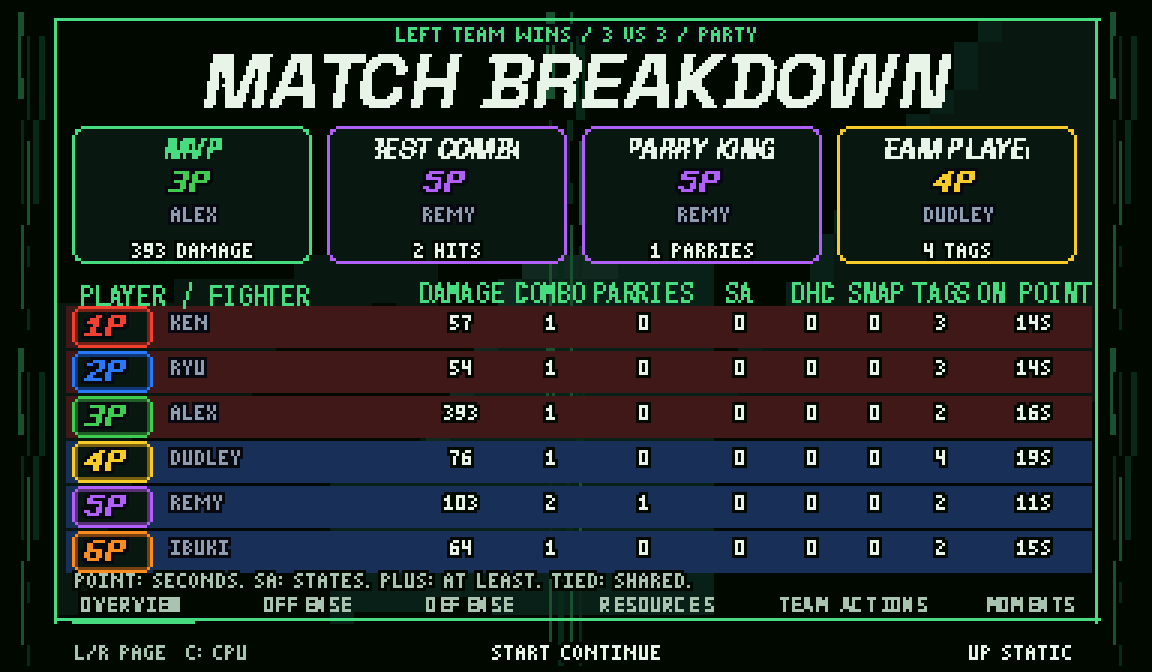
SF3 TAG V4.3 native Party breakdown: six original player badges, four colorful cards and all eight overview columns on the paused winner screen
V4.3 · Native Party captureSee the reproduced fixes ↓

Justin Wong Mode · fan nickname for flexible teams. Developed independently.

V4.3 community preview. Reproduced bug repairs, a post-winner match review and deliberately chosen CPU roles. The V4.1 tag and meter changes carry forward. Physical controllers, native Windows/macOS play and real online sessions still need acceptance testing. Checks and test scope ↗

V4.3 previewBuild from your clean Japan 990512 NO-CD game.

Windows installer sf3-tag-v4.3.cmd · 2.1 MBMac / Linux & setup ↓

01 · Justin’s review → independent fixes

Justin Wong’s review. Reproduced bugs. Our fixes.

His video featured bugs in original 3rd Strike. We reproduced the failures and repaired them in SF3 TAG. One replay runs both builds side by side, aligned at the same interaction. Each pane names its actual build.

GuileWinQuote’s analysis, shown in Justin’s review; Ken’s quote is Justin’s reaction. Independent fan repairs, with no affiliation or endorsement.

Our fix: finish the reflected self-hit reaction and return control.

Original recordings & sources

Before: Original Third Strike
After: SF3 TAG V4.2

Both replays share one playhead, aligned at the same interaction. Zooms and event pauses are presentation aids. Playback starts paused.

  1. Watch the reflected shot return to its owner. The self-hit frame repeats in this bounded native capture.
  2. The same reflection setup, with the repair active. Reflected damage remains; the reaction finishes and play continues.

01Temporal Thunder / Aegis

A reflected Super should finish.

“hitting a Temporal Thunder into an Aegis Reflector”

Before
The reflected projectile hits its caster and the game stops.
Our fix
The reflected hits finish and control returns. Reflection and damage stay intact.

Justin’s review · 17:45 ↗ · 2015 report ↗

Our fix: retire the abandoned throw wait so Urien can act again.

Original recordings & sources

Before: Original Third Strike
After: SF3 TAG V4.2

Both replays share one playhead, aligned at the same interaction. Zooms and event pauses are presentation aids. Playback starts paused.

  1. Remy’s neutral throw overlaps an Aegis hit. Urien remains in the orphaned waiting reaction.
  2. The same corner, jump and throw timing. The abandoned wait clears; follow-up hits and movement work.

02Remy throw / Aegis

Interrupt the throw. Keep playing.

“Remy getting hit by an Aegis”

Before
Aegis interrupts Remy’s throw, leaving Urien stuck even through time-over.
Our fix
Both fighters return to play. Remy still takes the Aegis hit; ordinary throws keep their damage.

Justin’s review · 17:52 ↗ · 2004 recipe ↗

Our fix: complete the throw KO, then let the winner continue to a playable next fight.

Original recordings & sources

Before: Original Third Strike
After: SF3 TAG V4.2

Both replays share one playhead, aligned at the same interaction. Zooms and event pauses are presentation aids. Playback starts paused.

  1. A final neutral throw takes Makoto below zero health. KO is reached; progression stops in the bounded stock probe.
  2. Same final throw. Watch the winner, report and next fight. The KO completes; the winner continues into a playable fight.

03Ken throw / Makoto KO

Finish the throw. Finish the round.

“This is such a random ass glitch.”

Before
Ken’s finishing throw on Makoto leaves the round stuck.
Our fix
The round finishes and the next fight plays. The demonstrated throw keeps its native reaction.

Justin’s review · 18:03 ↗

Our fix: restore the native green cue without refilling or restarting the install.

Original recordings & sources

Before: SF3 TAG V4.1
After: SF3 TAG V4.2

Both replays share one playhead, aligned at the same interaction. Zooms and event pauses are presentation aids. Playback starts paused.

  1. An installed attack after Yun returns from the bench. Genei Jin is still active, but its native afterimages are missing.
  2. Same return and attack; the existing install continues. Native green afterimages return and expire with the install.

04Genei Jin · our TAG regression

The install returns. Its cue should too.

The related review observation
Justin discusses Genei Jin’s duration and meter use. That led us to test how an active install survives a forced tag; he did not report this TAG-specific cue defect.
Our reproduced problem · V4.1
Snap Yun out during Genei Jin, then bring him back. His powered attacks return without their green afterimage cue.
Our repair · V4.2
The afterimage cue returns with the surviving install. The repair does not restart its timer or spend another stock.

Genei Jin discussion · 24:10 ↗ · The video’s later infinite discussion concerns Second Impact, not a demonstrated Third Strike infinite.

Both Aegis repairs pass on both sides and editions, including savestate replay and later progression. Read the exact test scope ↗

More improvements in this release

First DHC stock spend: with starting stocks enabled, the incoming fighter’s first DHC now spends exactly one stock. Watch the current handoff ↗

Immediate raw-tag handoff, vulnerable landings and the slim blue power meters are shown in the feature tour. Earlier fixes remain: the next CPU stage loads after a win, snapbacks use yellow effects, duplicate palettes display correctly and match stats track the team.

These changes are ours. We do not attribute every TAG feature to Justin’s video or claim to remove every legacy balance issue, unblockable or option select.

How far back do the Aegis reports go?

Our public-source search found at least seven Remy evidence locations: two 2004 forum threads, a contributed guide entry, a Japanese wiki and three recording uploads. These are documentation locations, not seven independent discoveries or a count of every occurrence.

For Temporal Thunder, we verified one first-person technical report from 2015. GuileWinQuote's 2024 analysis covers both bugs; Justin's reaction to that analysis is the same source family, not another discovery. Copied guide entries and reaction reposts are not counted separately.

02 · Match breakdown & CPU teams

Your match. Your pace. Your teams.

These features came from the project owner’s requests. They are separate from the public-video bugs and observations above.

SF3 TAG V4.3 · Party · six players

Party · six players: the winner is announced, then the restored overlay holds for manual browsing of all six pages.

Original recordings & sources

Trimmed fight lead-in and nearest-pixel enlargement; the report keeps native timing. Playback starts paused.

  1. Actual 6-owner controller-input capture, with three fighters on each side. Physical pad and online acceptance remain pending.
  2. The final native KO and winner announcement precede the report. The edit trims only the earlier fight; it changes no report timing.
  3. Browse Overview, Offense, Defense, Resources, Team Actions and Moments. The original owner badges remain attached to each fighter.
  4. Displayed statistics are earned by native gameplay inputs. HP-only finishing fixtures are recorded in the source receipt.
  5. All original owners release Start. The final original owner makes a fresh Start press, then release resumes the native flow once.

01Project-owner request · native match breakdown

Your match. Back in color.

The winner is announced, then the game pauses for your breakdown. The earlier colorful overlay returns, with its four cards, original controller badges, red/blue fighter rows and eight overview columns.

Watch six-player Party or Two-Player footage with the edition switch. Each film keeps its own player labels and capture receipt.

An earned Triple Finish, Four Down, Five Down or Team Sweep honor enters before the overview. These are recorded match totals, with ties and empty results handled explicitly.

Browse Overview, Offense, Defense, Resources, Team Actions and Match Moments. Page changes fade; press up for static changes. There are 24 counter cards across six pages: damage, combos, parries, blocks, KOs, healing and team actions. They show recorded leaders; context such as stun gained is labelled as a neutral spotlight.

How to continue; what the report measures

All original human owners first release Start. One of them makes a fresh Start press, then everyone releases Start again. A button held through the winner announcement cannot dismiss the report.

Recorded fields include damage, best combo, parries, KOs, HP lost/gained, bench healing, registered blocks, chip lost, observed stun, committed SA stocks and team actions. Overview shows approximate point seconds, including native freezes; other pages show raw ticks.

Match Moments is a bounded recent-event log, not a complete replay. Human/CPU segments identify who controlled the fighter. Unsupported throw-tech, punish and parry-subtype classifications are not inferred; there are no synthetic grades.
← / → · pages↑ · static / motionfresh Start · continue
Interactive illustration You control the steps
BUILD YOUR TEAM

5 fighters against 1. Only one fighter per side participates in combat; teammates wait on the bench.

02Project-owner request · chosen CPU teams

Choose the CPU matchup too.

One human can choose both team sizes and both rosters. There are 15 legal formats: one to five fighters on each side, six total.

In Party, dedicated CPU slots are deliberate. Pick a side, press MP to add a CPU or MK to remove one. These buttons change dedicated slots, not another person’s fighter.

The team-size graphic is an illustration. Start a local Party game ↓

← / → · side↑ / ↓ · sizeLP / Start · confirm

Explicit local CPU assistance and reclaim preserve your fighter’s resources and owner. Shown here in the Two-Player native diagnostic.

Original recordings & sources

Authored zooms and markers highlight the native action. Playback starts paused.

  1. The original human owner makes a fresh Start+LK+MK request.
  2. CPU assistance is accepted at an eligible stance, then a later fresh request reclaims the original owner’s fighter.
  3. One-second editorial pauses and Blender-authored focus mark the accepted authority changes.
  4. Exact shipping build, no setup writes; accepted role/HUMAN flags match the sampled native watch. This does not test physical pads, real online disconnection or guarantee immediate movement.

03Project-owner request · explicit assistance

Take a break. Keep your fighter.

Use the fresh chord to ask the CPU to play your fighter, or to reclaim it. The change waits for a safe actor or bench boundary; a held chord does not toggle repeatedly.

On the join/rules screens, Start + LK explicitly recovers missing or unready owners. Waiting alone does not assign the CPU, approve a rules vote or take a player’s controller.

This is local input authority. It does not repair a disconnected Fightcade peer or establish online acceptance.

Start + LK + MK · assist / return

V4.3 · Full trailer · 3:01

The fight. The fixes. The team.

Matched repairs, vulnerable tags, six original Party owners and both match breakdowns. Blender camera moves and circuit effects frame the recorded game; every clip keeps its actual build label.

V4.3 trailer · every gameplay source keeps its recorded build label

Three minutes of reproduced repairs, team play and the colorful winner-screen breakdown, with the supplied Moment37 music mix.

Original recordings & sources

Edited trailer: Blender camera moves, particles, Matrix graphics and music frame recorded gameplay. Each source retains its build identity. Playback starts paused.

  1. Justin Wong’s verified reaction concerns the original Ken/Makoto throw-KO bug. GuileWinQuote supplies the original Temporal/Remy analysis shown in that review.
  2. One movie pairs each original failure with its repaired V4.2 replay; Yun’s returning install keeps its V4.1/V4.2 labels.
  3. Fresh V4.3 clips show protected raw-tag flight, vulnerable landing, DHC stock commitment, yellow snapback and chosen 5v1 teams.
  4. CPU assistance/reclaim uses its recorded V4.2 Two-Player diagnostic.
  5. Actual V4.3 Party capture has six original owners using emulated inputs. Winner announcement leads into an earned KO honor and all six report pages; a separate Two-Player film shows its own winner, honor and overview.
  6. Blender camera moves, circuit particles and Matrix graphics are editorial framing. Diagnostic overlap setups and HP-only finishing fixtures are disclosed; there is no fabricated gameplay.
  7. Independent fan project, with no affiliation or endorsement. Physical controllers, native desktop frontend play and real online sessions remain unverified.

03 · What makes it TAG

What makes it TAG.

Build your team, pass a Super and commit to every tag. Fresh V4.3 clips show team selection, raw tags, DHC and snapback. Other inherited clips retain their recorded version labels.

SF3 TAG V4.3 · fresh native capture

The team-format screen chooses five fighters against one, then advances through selection and the rule votes.

Original recordings & sources

Native frames and timing; no editorial zooms. Playback starts paused.

  1. The team-format screen chooses five fighters against one, then advances through selection and the rule votes.
  2. Fresh final-build replay from cold boot with recorded controller inputs and no setup writes or imported states.
  3. Nearest-pixel enlargement and 30fps sampling preserve action timing; the companion retains the full native frame rate and game audio.
  4. These are emulated controller inputs; physical pads and real online sessions remain pending.

01Your teams

Five against one. Or your own matchup.

Choose one to five fighters per side, with six maximum across both teams. Only one fighter per side participates in combat; teammates wait on the bench.

A long roster or a solo specialist: you decide the matchup. V4.2 also lets one human choose both team sizes against the CPU; see the new CPU setup above.

5 vs 14 vs 23 vs 3or a smaller matchup
Interactive illustration You control the steps
BUILD YOUR TEAM

5 fighters against 1. Only one fighter per side participates in combat; teammates wait on the bench.

V4.1 · inherited footage · guided · silentFull-frame capture ↗Capture receipt ↗
Six scripted controllers join and confirm their sides, then skip the optional name screen with Start. Zooms and focus markers are editorial guides. Slow replays label their speed. The full-frame capture retains native timing and game audio.

02Party Edition

Your pad. Your fighter.

Two-Player Tag gives each player a whole roster. Party gives each human their own fighter and can add dedicated CPU teammates. Join a side, pick your fighter and enter your name.

Your controller follows your fighter through tags and KOs. Player 6 can join the left team; the pad number does not decide your side.

Start · join← / → · choose a sideLP · confirm
Interactive illustration You control the steps
SIX PADS. PICK A SIDE.

Player 6 joins the right team. Their controller still belongs to their own fighter, whichever side they choose.

V4.1 · inherited footage · guided · silentFull-frame capture ↗Capture receipt ↗
A proposal needs every player’s approval. This V4.1 capture shows the rules screen and its confirmation. Zooms and focus markers are editorial guides. Slow replays label their speed. The full-frame capture retains native timing and game audio.

03Your rules

Agree before the first punch.

Propose the health allowance, starting Super stocks and timer. Everyone must approve the change. One rejection, or no agreement within ten seconds, restores that setting’s default.

Then participating human owners press Start to ready up. In V4.2, Start + LK explicitly assigns CPU assistance to missing, unready owners; waiting alone never does it.

HealthStarting stocksClock
Interactive illustration You control the steps
EVERY PLAYER GETS A VOTE

Everyone accepts 75% health. The setting changes only when all players agree.

SF3 TAG V4.3 · fresh native capture

The incoming kick lands, the arrival pose remains vulnerable, and uninterrupted recovery returns control.

Original recordings & sources

Native frames and timing; no editorial zooms. Playback starts paused.

  1. The incoming kick lands, the arrival pose remains vulnerable, and uninterrupted recovery returns control.
  2. Fresh final-build replay from cold boot with recorded controller inputs and no setup writes or imported states.
  3. Nearest-pixel enlargement and 30fps sampling preserve action timing; the companion retains the full native frame rate and game audio.
  4. These are emulated controller inputs; physical pads and real online sessions remain pending.

04The V4 tag

Leave immediately. Land vulnerable.

The outgoing fighter becomes visual-only immediately, poses and retreats while the partner enters with a protected homing kick.

Land, and that protection ends. A short arrival pose leaves you open: no attack, block, parry, movement, jump or tag. A hit, throw or KO ends the pose permanently; normal control returns only after an uninterrupted pose finishes.

HP + HK · next↓ + HP + HK · previous
Interactive illustration You control the steps
TAG IN. LAND OPEN.
  1. 1HANDOFF
  2. 2ENTRY KICK
  3. 3LANDING POSE
  4. 4CONTROL

Combat ownership changes immediately. Ken becomes visual-only, taunts and retreats while Chun-Li enters.

Voluntary raw tags only. Click-stepped rules illustration using native portraits; this is not gameplay footage or a real-time timer.

Timing, recovery and route limits

The pose lasts 40 unfrozen action ticks. Hitstop and superfreeze pause it. Both poses use sanitized character animations without Personal Action bonuses, damage, grabs or spawned effects.

This landing pose applies only to voluntary raw tags. DHC, snapback and KO replacement have separate rules. The 30-tick retag cooldown starts when flight ends or an earlier airborne interruption occurs. An owned projectile or prohibited lasting mode refuses a raw tag; release and retry once it ends.

This is an SF3 adaptation inspired by crossover tag games, not a literal MVC taunt or a claim of frame-perfect equivalence.

SF3 TAG V4.3 · fresh native capture

Ken hands the Super Art to Ryu. The incoming fighter pays from their own meter.

Original recordings & sources

Native frames and timing; no editorial zooms. Playback starts paused.

  1. Ken hands the Super Art to Ryu. The incoming fighter pays from their own meter.
  2. Fresh final-build replay from cold boot with recorded controller inputs and no setup writes or imported states.
  3. Nearest-pixel enlargement and 30fps sampling preserve action timing; the companion retains the full native frame rate and game audio.
  4. These are emulated controller inputs; physical pads and real online sessions remain pending.

05Super handoff

Pass the Super. Spend their stock.

During an eligible Super Art, tag to a teammate doing their own grounded Super Art. The incoming fighter pays from their own meter.

Each character keeps their gauge length and stock capacity. Projectile, install, throw and hold restrictions still apply; this is a supported route, not a free cancel from every state.

Super Art → HP + HKeligible routes only
Interactive illustration You control the steps
SUPER → PARTNER → SUPER

During an eligible Super Art, use the tag command to request your partner’s Super Art.

Fixed in v4: the first DHC also spends the partner's stock when starting stocks are enabled. Character-specific meter lengths and stock limits stay intact.

Fixed in V4: the fresh reserve’s first DHC spends exactly one incoming stock. The current native replay shows the handoff.

SF3 TAG V4.3 · fresh native capture

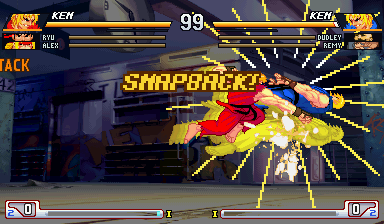
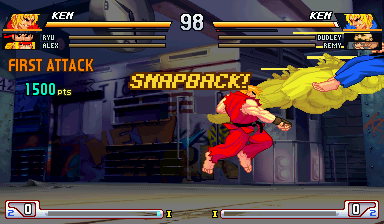
Two Kens trade yellow snapbacks. Both sides bring in their next living fighter.

Original recordings & sources

Native frames and timing; no editorial zooms. Playback starts paused.

  1. Two Kens trade yellow snapbacks. Both sides bring in their next living fighter.
  2. Fresh final-build replay from cold boot with recorded controller inputs and no setup writes or imported states.
  3. Nearest-pixel enlargement and 30fps sampling preserve action timing; the companion retains the full native frame rate and game audio.
  4. These are emulated controller inputs; physical pads and real online sessions remain pending.

06Snapback

Force their next fighter in.

A snapback sends the opponent’s point out and forces their next living fighter in. If both hits connect together, both teams switch.

Spend one stock to force a change in the matchup. MP + MK by itself still performs Third Strike’s Leap Attack.

↓ ↘ → + MP + MK1 stock · even on block or miss
Interactive illustration You control the steps
SNAPBACK! BOTH HITS COUNT.

Both snapbacks connect on the same frame: both teams must bring in their next living partner.

V4.1 · inherited footage · guided · silentFull-frame capture ↗Capture receipt ↗
The V4.1 HUD keeps five fighters visible on one team against a solo opponent. Zooms and focus markers are editorial guides. Slow replays label their speed. The full-frame capture retains native timing and game audio.

07The team life bars

Keep the whole team in view.

The point stays prominent. Living teammates sit below in tag order, with names, portraits and red recoverable life. Knocked-out fighters turn grey.

A tag turns the name over and brings the new point forward. You can see who is fighting now and who is waiting behind them.

Interactive illustration You control the steps
ON POINT AT THE TOP

The active fighter comes first. Living reserves sit below in tag order. Simplified HUD illustration.

What happens to recoverable life?

Tag out, and the existing 256-tick healing wait begins at the immediate handoff. Bench fighters recover red life after the wait. The active fighter does not heal; returning discards red life that has not recovered.

V4.1 · inherited footage · guided · silentFull-frame capture ↗Capture receipt ↗
Close-ups show the slim blue charge bars, clear Super Art labels and centered stock dots. Zooms and focus markers are editorial guides. Slow replays label their speed. The full-frame capture retains native timing and game audio.

08The V4 power meters

Gold for life. Blue for power.

Shorter, thinner cyan-to-blue power bars give charge its own identity beneath the warm gold life bars. Super Art labels sit above centered stock dots, clear of the corner.

The artwork changes; every fighter keeps their native meter capacity, stock cost and install countdown.

SA I / II / IIIlabel above · stocks below
Interactive illustration You control the steps
GOLD LIFE. BLUE POWER.

Two complete stocks plus half a bar. The smaller dots sit centered under SA III, clear of the meter frame.

Illustrated Ken SA III meter. The bar is shorter and slimmer than life; characters keep their native stock limits and gauge lengths.

V4.1 · inherited footage · guided · silentFull-frame capture ↗Capture receipt ↗
An equal-share timeout reaches Third Strike’s original judges. The 60% versus 40% example beside it is an interactive illustration. Zooms and focus markers are editorial guides. Slow replays label their speed. The full-frame capture retains native timing and game audio.

09Time over

Compare health, not team size.

The clock runs out. The game compares actual health left as a percentage of each team’s starting health; red recoverable life does not count.

In this illustration, a solo fighter at 60% beats a five-fighter team at 40%. Equal shares go to Third Strike’s original judges.

Interactive illustration You control the steps
00 · COMPARE THE HEALTH SHARES

In this example, the solo fighter wins: 60% left beats 40%. The game compares each team’s share, so a bigger roster does not win just for being bigger.

V4.1 · inherited footage · guided · silentFull-frame capture ↗Capture receipt ↗
V4.1 opened this older award breakdown when the losing side continued. V4.3 restores its colorful layout within the held post-winner report above. Zooms and focus markers are editorial guides. Slow replays label their speed. The full-frame capture retains native timing and game audio.

10V4.1 history

The earlier breakdown, in context.

This inherited capture shows the earlier V4.1 breakdown. Its continue-time placement and four awards belong to that build.

The current preview announces the winner first and holds the enriched six-page native overlay with manual continuation. Watch the new report ↑

Watch the original V3 trailer

The original team-game trailer.

Historical V3 footage with narration: formats, rule votes, DHC, trades and Party play. It predates V4’s landing recovery and blue meters.

SF3 TAG V3 — historical team-game trailerYouTube ↗

04 · Install & play

Choose how you play.

Both editions include the flexible team format: 1–5 fighters per side, with at most six fighters total. One installer makes both editions.

Fightcade · Two-Player Tag

One person controls a team.

Two players use ports 1 and 2. Each controls their whole team.

sfiii3nr1.zip

Fightcade setup ↓

RetroArch · Party Edition

One person controls a fighter.

Human and CPU fighters use the custom SF3 TAG core. Each human pad follows its fighter.

sf3tag.zip

RetroArch Party setup ↓

First, make your patched game.

You need your own clean sfiii3nr1.zip — Japan 990512, NO CD. Downloads contain patches and tools, with no game ROMs. Keep your original ZIP as a backup.

Windows: download the V4.3 installer sf3-tag-v4.3.cmd · 2.1 MB
  1. Put the files together. Place sf3-tag-v4.3.cmd beside your clean sfiii3nr1.zip. Keep the game zipped.
  2. Run the installer. Double-click the .cmd file and wait for the success message. It checks the clean game and makes patched copies.
  3. Open sf3_tag_v4.3. Use the ZIP for your chosen edition below. Keep both ZIPs zipped and keep their names.

Success looks like: a new sf3_tag_v4.3 folder containing sfiii3nr1.zip, sf3tag.zip and receipt.json.

Mac / Linux: make the patched game
Download the Python patch package sf3-tag-v4.3-patch.zip · 3.6 MB
  1. Extract the package. Install Python 3 if needed.
  2. Open a terminal in the extracted folder. Run the following command with the actual path to your clean ZIP:python3 sf3_tag_patch.py "/path/to/sfiii3nr1.zip"
  3. Open the new sf3_tag_v4.3 folder beside the clean ZIP. Continue with your edition below.

Mac Party requires building a core. Read its requirements in the RetroArch section before starting.

Updating? Start from the clean original again. Move an existing sf3_tag_v4.3 folder somewhere safe before rerunning; generated files can be replaced. See installer help if a check fails.

Fightcade · Two-Player Tag

One person controls each team.

Finish the patch step first. Use sf3_tag_v4.3/sfiii3nr1.zip, your patched copy.

Fightcade / Installation guideWindows · illustration, not a screen recording
STEP 01 / 07

Put these two files together.

Put your own clean sfiii3nr1.zip and sf3-tag-v4.3.cmd in the same folder. Keep the game zipped.

YOU SHOULD SEE

One folder contains the clean game and the patcher.

Need more detail?

The source must be Third Strike Japan 990512, NO CD. Keep a clean backup before patching.

YOUR PATCH FOLDER
Your clean gamesfiii3nr1.zip
V4.3 patchersf3-tag-v4.3.cmd
Same folder · game ZIP intact
Written setup checklist
  1. Find Fightcade's ROM folder. Choose ROMs → Open ROMs folder and open the FBNeo folder. This finds the right location on Windows, Mac or Linux.
  2. Back up, then replace. Close the running emulator. Move the original sfiii3nr1.zip to a backup outside that ROM folder, then copy in sf3_tag_v4.3/sfiii3nr1.zip. Keep it zipped. A typical Windows location is Fightcade/emulator/fbneo/ROMs.
  3. Test locally first. Join the Third Strike channel and click Test game. Press F5 in the emulator to map buttons. Start a versus game with two players.

Check: the team-format screen lets each side choose its team size, and the match shows team life bars plus the new blue power meters.

Fightcade uses its own emulator; it does not need the RetroArch core pack. Real Fightcade online play remains unverified. For an online test, both players must use the same V4.3 patched game. Restore your clean backup to return to ordinary 3rd Strike. Fightcade help ↗

Two-player RetroArch or MAME instead

RetroArch: download and extract the core pack below. In Settings → Directory, find your configured Cores and Core Information folders. Copy the correct core and fbneo_sf3tag_libretro.info there. Choose Load Core → Arcade (FinalBurn Neo - SF3 TAG), then Load Content → sf3_tag_v4.3/sfiii3nr1.zip. This edition uses ports 1 and 2.

MAME: use separate NVRAM. From the folder containing sf3_tag_v4.3, run:mame sfiii3nr1 -rompath sf3_tag_v4.3 -nvram_directory sf3_tag_v4.3/nvramChanged-chip checksum warnings are expected for the patched copy.

RetroArch · Party Edition

A controller for each fighter.

Windows x64 quickstart. You need RetroArch, the custom core pack and sf3_tag_v4.3/sf3tag.zip from the patch step.

Download the V4.3 core + launchers sf3-tag-v4.3-retroarch.zip · 6.5 MB
RetroArch / Installation guideWindows · illustration, not a screen recording
STEP 01 / 08

Put these two files together.

Put your own clean sfiii3nr1.zip and sf3-tag-v4.3.cmd in the same folder. Keep the game zipped.

YOU SHOULD SEE

One folder contains the clean game and the patcher.

Need more detail?

The source must be Third Strike Japan 990512, NO CD. Keep a clean backup before patching.

YOUR PATCH FOLDER
Your clean gamesfiii3nr1.zip
V4.3 patchersf3-tag-v4.3.cmd
Same folder · game ZIP intact
Written setup checklist
  1. Install RetroArch. Extract the entire core pack. On Windows, right-click the downloaded ZIP and choose Extract All. Open the extracted folder.
  2. Drag the game onto PLAY. Drop sf3_tag_v4.3/sf3tag.zip onto PLAY SF3 TAG 6P.cmd. Keep the extracted pack together.
  3. Assign your controllers. Open Settings → Input → RetroPad Binds → Port X Controls → Device Index (some versions skip RetroPad Binds). Give each port a different physical pad. With two pads, use ports 1 and 4; add other pads to remaining ports.

Check: the running core's name includes (SF3 TAG), and Party shows the player-join screen. The regular FinalBurn Neo core does not provide six controller ports.

How everyone joins a Party game
  1. Start the people who will play. For two human sides, use ports 1 and 4: Select inserts a coin, then Start begins. For one human against the CPU, start port 1 or port 4.
  2. Join with your own pad. Everyone presses Start on the join screen, then moves left or right to a team. P1–P6 identify controllers, so P6 can join the left team.
  3. Confirm your side. LP (RetroPad Y) or Start confirms. LK (RetroPad B) steps back: unconfirm, return to the middle, then leave. Each side needs at least one fighter; MP adds a dedicated CPU on your chosen side, and MK removes one. Keep the combined roster at six or fewer. All ready and unchanged for three seconds locks the teams.
  4. Pick and ready up. Enter up to six letters for your name, or Start on an empty name to skip. Pick your fighter and Super Art, vote on rules, then participating human owners press Start to ready up. Start + LK explicitly CPU-fills missing, unready owners; it does not approve a vote.

Your controller follows your fighter through tags and KOs. If you want one person controlling a whole roster, use Two-Player Tag. Dedicated CPU slots have no human claimant; CPU-assisted human fighters retain their original owner for return.

Linux requirements and launch command

The bundled core requires Linux x86_64, glibc 2.38+, and GLIBCXX_3.4.29 from libstdc++. Check glibc with ldd --version. Install RetroArch and extract the whole core pack.

sh play_sf3_tag_6p.sh "/path/to/sf3_tag_v4.3/sf3tag.zip"

Run this inside the extracted pack. The launcher uses RetroArch on PATH, Flatpak, or the path you supply in RETROARCH.

Mac requirements — build the custom core first

A ready macOS .dylib is not included. Install RetroArch, Git, Python 3 and Xcode's command-line tools (including make, Perl and a C/C++ compiler). Extract the core pack and open a terminal there.

sh src/build_core.sh src/FBNeo

A fresh build downloads pinned FinalBurn Neo source from GitHub and needs Internet access. It writes src/FBNeo/src/burner/libretro/fbneo_sf3tag_libretro.dylib, where the launcher searches.

sh play_sf3_tag_6p.sh "/path/to/sf3_tag_v4.3/sf3tag.zip"

Native macOS play remains unverified.

No launch, only two ports, or an older version? See RetroArch help. For button binding, use RetroArch's controller guide ↗.

Quick reference · Play

The commands you need.

Tag next / previous
HP + HK / down + HP + HK. Requires an eligible living partner.
DHC · pass your super
During an eligible Super Art, request a tag. The incoming fighter needs a stock; the route must be allowed.
Snapback · force their partner in
Quarter-circle forward + MP + MK. Costs a stock when an eligible reserve exists. A block or miss still spends it; simultaneous hits both resolve. MP + MK alone remains Leap Attack.
Party CPU slots
On your chosen join-screen side, MP adds a CPU; MK removes a dedicated CPU. Start + LK explicitly handles missing, unready owners at join/readiness.
Take a break / return
A fresh Start + LK + MK requests CPU assistance or reclaims your own fighter at a safe boundary.
Match review
Left/right changes page; up toggles static/motion. All original owners release Start, one makes a fresh Start press, then all release to continue.
Menus and rule votes
LP or Start confirms; LK backs out. Up/down selects; left/right changes. LP approves a rule proposal, LK rejects it. Everyone must agree within ten seconds.
RetroPad buttons, team formats and optional rules

LP → Y · MP → X · HP → L · LK → B · MK → A · HK → R. Select inserts a coin. Start begins play outside a match and performs Personal Action during it. The fresh Start + LK + MK chord instead requests CPU assistance or return.

Two-Player versus uses ports 1 and 2. In a one-human CPU game, left/right selects the side’s size field, up/down changes that size and LP or Start confirms both teams. Choose from 15 legal formats: one to five per side, six total. The present human selects both rosters; no automatic absence timer fills a role.

Optional votes: health 100%, 75% or 50%; starting stocks empty, one or full; standard, extended or unlimited clock. No unanimous approval within ten seconds restores that setting's default.

Help · Keep playing

Stuck? Start with the symptom.

Installer says wrong game / missing chip / file not found

Use the complete, clean Japan 990512 NO-CD sfiii3nr1.zip. A previously patched game or another mod cannot be the starting file. Keep it zipped.

On Windows, drag the clean ZIP onto the installer if it is in another folder. On Mac/Linux, give the full quoted path. Move an existing sf3_tag_v4.3 folder aside before retrying.

RetroArch will not open / core is missing

Extract the whole core pack and keep its files together. If RetroArch cannot be found, follow the launcher's RETROARCH path instruction. Windows needs x64 RetroArch; Linux needs glibc 2.38+; Mac needs a locally built core.

Only two controller ports / wrong edition / older game opens

Party requires both the SF3 TAG core and sf3tag.zip. The ordinary FinalBurn Neo core or Two-Player sfiii3nr1.zip cannot provide the Party setup.

Drag the game inside sf3_tag_v4.3 onto PLAY. The V4.3 launcher ignores older output folders. With two human Party sides, assign ports 1 and 4, then start both. For one human against CPU, start either native entry port.

What is still missing or unverified?

Physical-controller sessions, native Windows/macOS play and real online sessions remain open acceptance milestones. Party's published setup is local play; it is not a verified six-person online walkthrough.

DHC-ready indicators, quick rematch, ordinary assists and ratio teams are deferred. V4.2 includes dedicated Party CPU slots and explicit assistance/reclaim.

Build receipts, test scope and technical notes

The exact V4.3 preview.

Updated Oct 8, 2026 · clean parent: Japan 990512, NO CD.

Release receipt · Patch README · Core README · Installer / launcher checks · V4.3 regression checks · V4.3 report and paired edit provenance · Original V4.2 capture provenance · Historical V4.1 Aegis captures · Historical V4.1 feature captures · Guided repair edits · Historical V4 blue HUD provenance · V4 tag gameplay provenance

ROM-free, member-checked community preview. Fresh V4.3 checks cover 420 report-renderer cases, 140 lifecycle checks, the recorded Two-Player and six-owner Party sessions, CPU continuation and badge/capacity/savestate behavior. The full V4.2 gameplay evidence remains inherited under its original identities. Physical controllers, native Windows/macOS frontend play and real online sessions remain unverified. Local CPU assistance does not detect network disconnects.

The inherited V4.2 receipt separates raw-tag and CPU tests, explicit DHC manifests, stock accounting, report rendering, savestate continuation and reproduced bug controls. The named DHC matrices are not every possible source/destination pairing. Where reached, a neutral-state probe checks recovery; early refused routes exit before that probe. The DHC sweeps do not press movement inputs.

Separate bug recipes require later movement or a playable next fight. Report rendering and human/CPU continuation have their own checks. Every result is bound to its actual game and core; native Windows/macOS, physical controllers and real online play remain unverified.

Historical V4/V4.1 receipts remain available under their original version paths. They are not relabelled as new V4.2 test runs. The V4.3 receipt separately binds the current report renderer, both winner sides, original owner controls, save/restore and capacity checks. Inherited gameplay tests retain their V4.2 build identity.

The installation guide uses one action, a visible result and manual Next, with optional replay and nearby input cues. This is our adaptation of instructional-video segmentation research and AutoCue’s cue-design research; newcomer installation testing remains a separate check.

Matched recipes, explicit baseline labels and a focused visual cue connect each video to its outcome. These are our presentation choices, informed by visual-anchor tutorial research; they are not proof of fighting-game learning gains.

Download SF3 TAG V4.3 · Windows installer sf3-tag-v4.3.cmd · 2.1 MB

SHA-256 b1c5c8a524380ee8c5b5c177d0d77f9cbe5805173d598d4e3746ab23e0af1104

V4.3 · Windows + Python patch package sf3-tag-v4.3-patch.zip · 3.6 MB

SHA-256 f6f935be3ed84a2329f7e37969a330f50edae102a5563dd79f620b3e26f14707

V4.3 · RetroArch custom core + launchers sf3-tag-v4.3-retroarch.zip · 6.5 MB

SHA-256 e9f6caf99f08b7594628a36ae3fa16b19011c3b82fca0f4b00f586007a0b7d76

Historical V3.1 snapback evidence

Yellow identifies snapback; Super Arts keep their blue. The original frame log and hashes remain available as optional evidence.

V3.1 still-frame manifest
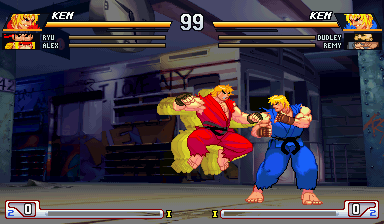
The press: the stage darkens and yellow afterimages build behind Ken.
The hit: a burst, speed lines and SNAPBACK! on screen.
Its own afterimages trail it off screen; its next partner is forced in.